Home / Restaurant Billing Software
For QSR, fine dining, cloud kitchens & sweet shopsRestaurant billing software that keeps the counter and the kitchen in sync
Go2 runs the floor and the kitchen from one screen — fire KOTs, watch every table change state, track prep time and let recipes pull raw material out of stock as dishes sell.
- Fire a ticket straight to the kitchen with Send to KOT, or tick Create KOT Only to send food without billing yet
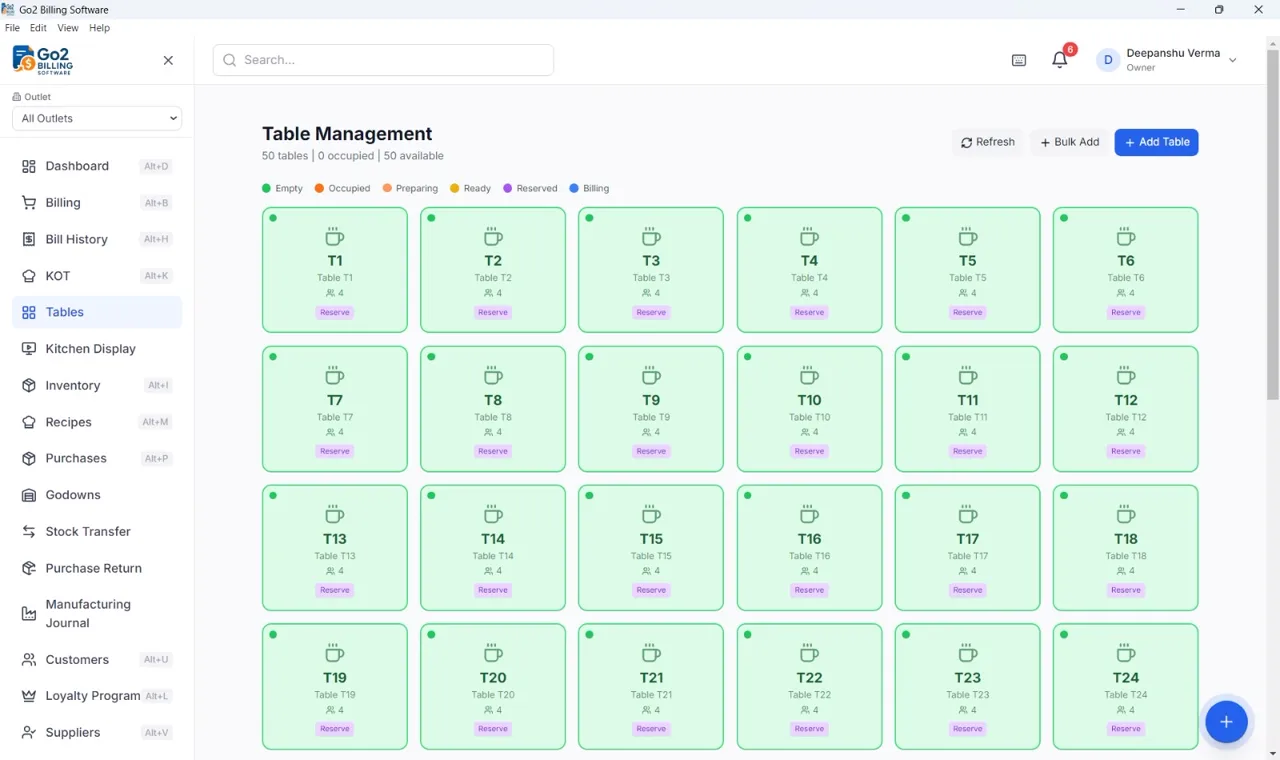
- Live table map tracks every table across Empty, Occupied, Preparing, Ready, Reserved and Billing — with seat counts and reservations
- Kitchen Display screen shows Pending, Preparing and Ready to Serve counts alongside average prep time
- Recipes deduct raw ingredients from inventory automatically each time a dish is sold
- Item notes like “extra spicy, no onion” ride along with the ticket to the kitchen
From order taken to table cleared
KOT and kitchen display
Send orders to the kitchen printer or the Kitchen Display screen, and watch tickets move from pending to ready.
Tables and reservations
A live floor map with per-table seat counts, reserve status and bulk table setup for bigger dining rooms.
Recipe-linked stock
Define what goes into each dish and let Go2 pull the raw material out of inventory as you sell.
Split and part payments
One table, several payers — split across Cash, UPI, Card and Bank, or leave a balance on Pay Later.
Restaurant owner questions, answered
Can I send KOTs to a separate kitchen printer?
Yes. The billing screen has a dedicated KOT Screen button and a Create KOT Only option, so food orders reach the kitchen printer independently of the customer bill.
I run a cloud kitchen with no dine-in tables. Is this still useful?
Yes — skip Table Management entirely and work from Billing plus Kitchen Orders. The KOT queue, prep-time tracking and recipe-linked stock all work without a single table defined.
What happens to running tables if the internet drops mid-service?
Go2 Offline runs in Local Mode on the machine itself. Open tables, KOTs and bills keep working through the outage and sync once you are back online.
Ready to see it on your own counter?
7-day free trial · All features unlocked · No credit card
Chat on WhatsApp